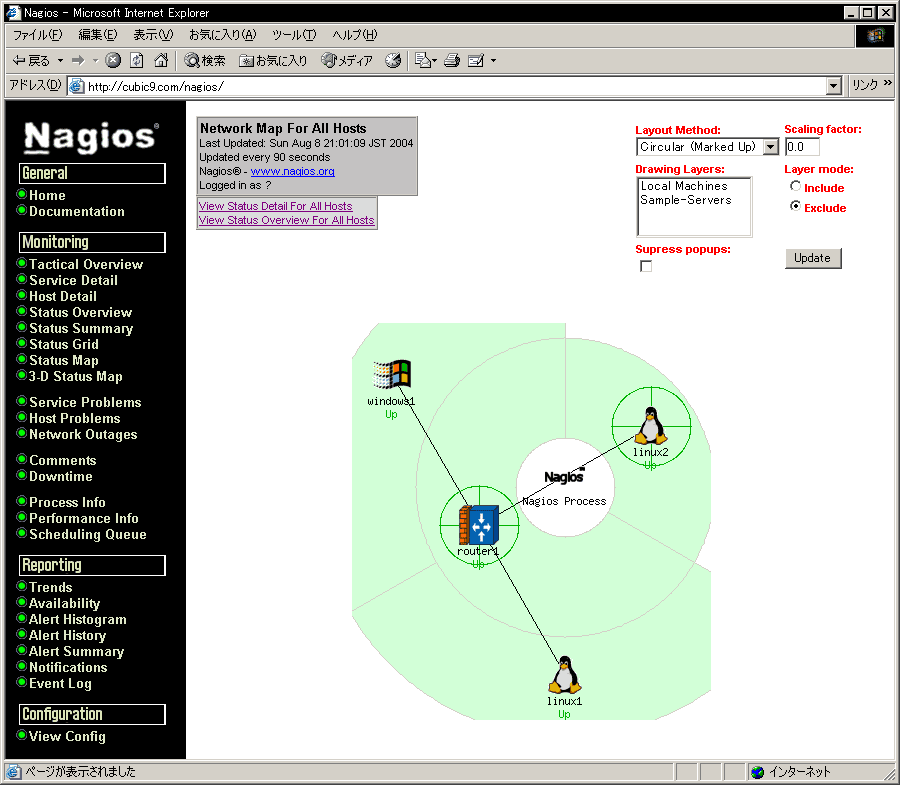
設定
以下
| 監視対象ホスト | IP | 監視対象サービス |
| router1 | 192.168.0.1 | PING |
| linux1 | 192.168.0.2 | SSH |
| windows1 | 192.168.0.10 | PING |
| linux2 | 172.16.0.1 | HTTP |
と仮定。
設定ファイル
| ファイル名 | 詳細 |
| cgi.cfg | CGI設定 |
| checkcommands.cfg | 監視のために実行するコマンド |
| contactgroups.cfg | アラート通知先のグループ |
| contacts.cfg | アラート通知先 |
| dependencies.cfg | 依存定義 |
| escalations.cfg | 詳細なアラートの通知方法 |
| hostgroups.cfg | 監視対象ホストのグループ |
| hosts.cfg | 監視対象ホスト |
| misccommands.cfg | アラートを通知するためのコマンド |
| nagios.cfg | メイン設定 |
| resource.cfg | リソース設定 |
| services.cfg | チェックする各監視対象ホストのサービス |
| timeperiods.cfg | アラートを通知する時間帯 |
| その他の *.cfg | ホストごとのサービスの設定 (自分で作成) |
cgi.cfg
認証周りだけ設定。guestは閲覧のみ可能。
vi /usr/local/nagios/etc/cgi.cfg
authorized_for_system_information=nagiosadmin
authorized_for_configuration_information=nagiosadmin
authorized_for_system_commands=nagiosadmin
authorized_for_all_services=nagiosadmin,guest
authorized_for_all_hosts=nagiosadmin,guest
authorized_for_all_service_commands=nagiosadmin
authorized_for_all_host_commands=nagiosadmin
checkcommands.cfg
適当に追加
vi /usr/local/nagios/etc/checkcommands.cfg
# 'check_ssh' command definition
define command{
        command_name    check_ssh
        command_line    $USER1$/check_ssh -t $ARG1$ $HOSTADDRESS$
        }
contacts.cfg
通知先を変更
vi /usr/local/nagios/etc/contacts.cfg
# 'nagios' contact definition
define contact{
        contact_name                    nagios
        alias                           Nagios Admin
        service_notification_period     24x7
        host_notification_period        24x7
        service_notification_options    w,u,c,r
        host_notification_options       d,u,r
        service_notification_commands   notify-by-email
        host_notification_commands      host-notify-by-email
        email                           nagios-admin@example.com
        }
hostgroups.cfg
グループごとに分ける
vi /usr/local/nagios/etc/hostgroups.cfg
# 'local-machines' host group definition
define hostgroup{
        hostgroup_name  local-machines               ; ホストグループ名
        alias           Local Machines               ; 愛称
        contact_groups  linux-admins                 ; 通知グループ
        members         router1,linux1,windows1      ; メンバー
        }

# 'sample-servers' host group definition
define hostgroup{
        hostgroup_name  sample-servers
        alias           Sample-Servers
        contact_groups  linux-admins
        members         linux2
        }
hosts.cfg
ホストの設定は一般設定に極力まとめてしまう
vi /usr/local/nagios/etc/hosts.cfg
# Generic host definition template
define host{
        name                            generic-host ; テンプレート名
        notifications_enabled           1            ; 通知の有無
        event_handler_enabled           1            ; イベントハンドラの有無
        flap_detection_enabled          1            ; ステータス反転の検出
        process_perf_data               1            ; パフォーマンス情報を保存
        retain_status_information       1            ; ステータス情報を保存
        retain_nonstatus_information    1            ; ステータス情報以外を保存

        register                        0            ; この設定をテンプレートとして登録

        max_check_attempts      10                   ; リトライ回数
        notification_interval   480                  ; 通知間隔
        notification_period     24x7                 ; 通知時間帯
        notification_options    d,u,r                ; このステータスのときに通知
        }

# 'router1' host definition
define host{
        use                     generic-host

        host_name               router1
        alias                   Router #1
        address                 192.168.0.1
        check_command           check-host-alive
        }

# 'linux1' host definition
define host{
        use                     generic-host         ; 使用するテンプレート

        host_name               linux1               ; ホスト名
        alias                   Linux Server #1      ; 愛称
        address                 192.168.0.2          ; IP
        parents                 router1              ; 親となるホスト
        check_command           check-host-alive     ; 生死チェックのコマンド
        }

# 'windows1' host definition
define host{
        use                     generic-host

        host_name               windows1
        alias                   Windows #1
        address                 192.168.0.10
        parents                 router1
        check_command           check-host-alive
        }

# 'linux2' host definition
define host{
        use                     generic-host

        host_name               linux2
        alias                   Linux Server #2
        address                 172.16.0.1
        check_command           check-host-alive
}- notification_periodの取る値は timeperiods.cfg の timeperiod_name
- notification_optionsの取る値
d DOWN u UNREACHABLE r 回復したら n 通知しない - parentsは Status Map, 3-D Status Map 等で必要になるので、きちんと指定すること。
指定されていない場合はNagios Process(図の中心)を親とします。
misccommands.cfg
通知メールを読みやすく。
# 'notify-by-email' command definition
define command{
        command_name    notify-by-email
        command_line    /usr/bin/printf "%b" "***** Nagios *****\n\nType   : $NOTIFICATIONTYPE$\n\nService: $SERVICEDESC$\nHost   : $HOSTALIAS$ ($HOSTNAME$)\nAddress: $HOSTADDRESS$\nState  : $SERVICESTATE$\nDate   : $SHORTDATETIME$\nInfo   :\n\n$OUTPUT$" | /usr/local/nagios/sbin/mail.pl "** $NOTIFICATIONTYPE$ alert - $HOSTALIAS$ ($HOSTNAME$)/$SERVICEDESC$ is $SERVICESTATE$ **" $CONTACTEMAIL$
        }

# 'host-notify-by-email' command definition
define command{
        command_name    host-notify-by-email
        command_line    /usr/bin/printf "%b" "***** Nagios *****\n\nType    : $NOTIFICATIONTYPE$\nHost   : $HOSTNAME$\nState  : $HOSTSTATE$\nAddress: $HOSTADDRESS$\nInfo   : $OUTPUT$\n\nDate   : $SHORTDATETIME$\n" | /usr/local/nagios/sbin/mail.pl "Host $HOSTSTATE$ alert for $HOSTNAME$!" $CONTACTEMAIL$
        }
mail.pl はDevel/Perl/Net-SMTPのものを/usr/local/nagios/sbin/mail.plとして保存して使用。
nagios.cfg
dependencies.cfgとescalations.cfgは今回は使用しません。
サービスの設定はホストごとに別ファイルにして管理を楽にします。
日付は読みやすい形式(YYYY-MM-DD HH:MM:SS)に変更。
vi /usr/local/nagios/etc/nagios.cfg
#cfg_file=/usr/local/nagios/etc/dependencies.cfg
#cfg_file=/usr/local/nagios/etc/escalations.cfg
cfg_file=/usr/local/nagios/etc/s_router1.cfg
cfg_file=/usr/local/nagios/etc/s_linux1.cfg
cfg_file=/usr/local/nagios/etc/s_windows1.cfg
cfg_file=/usr/local/nagios/etc/s_linux2.cfg
#date_format=us
date_format=iso8601
CGI経由で設定変更する場合は
groupadd nagiocmd
usermod -G nagiocmd nagios
usermod -G nagiocmd apache
chown nagios.nagiocmd /usr/local/nagios/var/rw
chmod 2770 /usr/local/nagios/var/rw
vi /usr/local/nagios/etc/nagios.cfg
check_external_commands=1
services.cfg
サービスの設定も極力一般設定にまとめてしまう
vi /usr/local/nagios/etc/services.cfg
# Generic service definition template
define service{
        name                            generic-service ; テンプレート名
        active_checks_enabled           1               ; 自身でのチェックの有無
        passive_checks_enabled          1               ; DMSによるチェックの有無
        parallelize_check               1               ; 並列チェックの有無
        obsess_over_service             1               ; サービスに付きまとうか
        check_freshness                 0               ; 鮮度チェックの有無
        notifications_enabled           1               ; 通知の有無
        event_handler_enabled           1               ; イベントハンドラの有無
        flap_detection_enabled          1               ; ステータス反転の検出
        process_perf_data               1               ; パフォーマンス情報を保存
        retain_status_information       1               ; ステータス情報を保存
        retain_nonstatus_information    1               ; ステータス情報以外を保存

        register                        0               ; この設定をテンプレートとして登録

        notification_interval           120             ; 通知間隔
        notification_period             24x7            ; 通知時間帯
        notification_options            w,u,c,r         ; このステータスのときに通知
        contact_groups                  linux-admins    ; 通知グループ
}- notification_periodの取る値は timeperiods.cfg の timeperiod_name
- notification_optionsの取る値
w WARNING u UNKNOWN c CRITICAL r 回復したら n 通知しない
s_router1.cfg
別ファイルにしたサービスの設定
vi /usr/local/nagios/etc/s_router1.cfg
# router1
define service{
        use                             generic-service ; 使用するテンプレート名

        host_name                       router1         ; 対象ホスト名
        service_description             PING            ; 対象サービスの説明
        is_volatile                     0               ; 揮発性の有無
        check_period                    24x7            ; チェック時間帯
        max_check_attempts              3               ; リトライ回数
        normal_check_interval           5               ; チェック間隔
        retry_check_interval            1               ; リトライ間隔
        check_command                   check_ping!100.0,20%!500.0,60% ; チェックコマンド
}- check_periodの取る値は timeperiods.cfg の timeperiod_name
s_linux1.cfg
別ファイルにしたサービスの設定
vi /usr/local/nagios/etc/s_linux1.cfg
# linux1
define service{
        use                             generic-service

        host_name                       linux1
        service_description             SSH
        is_volatile                     0
        check_period                    24x7
        max_check_attempts              3
        normal_check_interval           1
        retry_check_interval            1
        check_command                   check_ssh!2
        }
s_windows1.cfg
別ファイルにしたサービスの設定
vi /usr/local/nagios/etc/s_windows1.cfg
# windows1
define service{
        use                             generic-service

        host_name                       windows1
        service_description             PING
        is_volatile                     0
        check_period                    24x7
        max_check_attempts              3
        normal_check_interval           5
        retry_check_interval            1
        check_command                   check_ping!100.0,20%!500.0,60%
        }
s_linux2.cfg
別ファイルにしたサービスの設定
vi /usr/local/nagios/etc/s_linux2.cfg
# linux2
define service{
        use                             generic-service

        host_name                       linux2
        service_description             HTTP
        is_volatile                     0
        check_period                    24x7
        max_check_attempts              3
        normal_check_interval           1
        retry_check_interval            1
        check_command                   check_http
        }
Apacheの設定
vi /usr/local/apache2/conf/httpd.conf
# for Nagios
ScriptAlias /nagios/cgi-bin/ "/usr/local/nagios/sbin/"
<Directory "/usr/local/nagios/sbin">
    Options ExecCGI
    Order allow,deny
    Allow from all

    AuthUserFile  /usr/local/nagios/etc/.htpasswd
    AuthName      "Please Enter Your Password"
    AuthType      Basic
    Require valid-user
</Directory>

Alias /nagios/ "/usr/local/nagios/share/"
<Directory "/usr/local/nagios/share">
    Options None
    Order allow,deny
    Allow from all

    AuthUserFile  /usr/local/nagios/etc/.htpasswd
    AuthName      "Please Enter Your Password"
    AuthType      Basic
    Require valid-user
</Directory>
/usr/local/apache2/bin/htpasswd -c /usr/local/nagios/etc/.htpasswd nagiosadmin /usr/local/apache2/bin/htpasswd /usr/local/nagios/etc/.htpasswd guest
設定を再読み込み
/etc/rc.d/init.d/httpd graceful
設定が終わったら
設定ファイルの整合性を確認
/usr/local/nagios/bin/nagios -v /usr/local/nagios/etc/nagios.cfg
Total Warnings: 0
Total Errors: 0
となっていることを確認して、
Nagiosを起動
/etc/rc.d/init.d/nagios start
ちなみに監視中に設定を再読み込みするには下記のようにする
/etc/rc.d/init.d/nagios reload
Status Map, 3-D Status Map 等のアイコン
3-D Status Mapの表示
- まず、クライアントマシンにCortona VRML ClientなどのVRMLプラグインを入れます。
- 次にNagios監視サーバーのMIMEを書き換えます。
vi /etc/mime.types
# model/vrml                     wrl vrml
x-world/x-vrml                  wrl
Tips
サービスは以下のようにまとめて書けます。
# servers
define service{
        use                             generic-service

        host_name                       linux1,linux2,windows1
        service_description             HTTP
        is_volatile                     0
        check_period                    24x7
        max_check_attempts              3
        normal_check_interval           1
        retry_check_interval            1
        check_command                   check_http
        }